Mininio: Carb & Insulin Calc

The private, offline carb calculator with custom insulin ratio math. Your data, your device, your numbers.

v0.19.1 Android 10 Languages CC BY-NC-SA 4.0
Get it on Google Play Explore Features
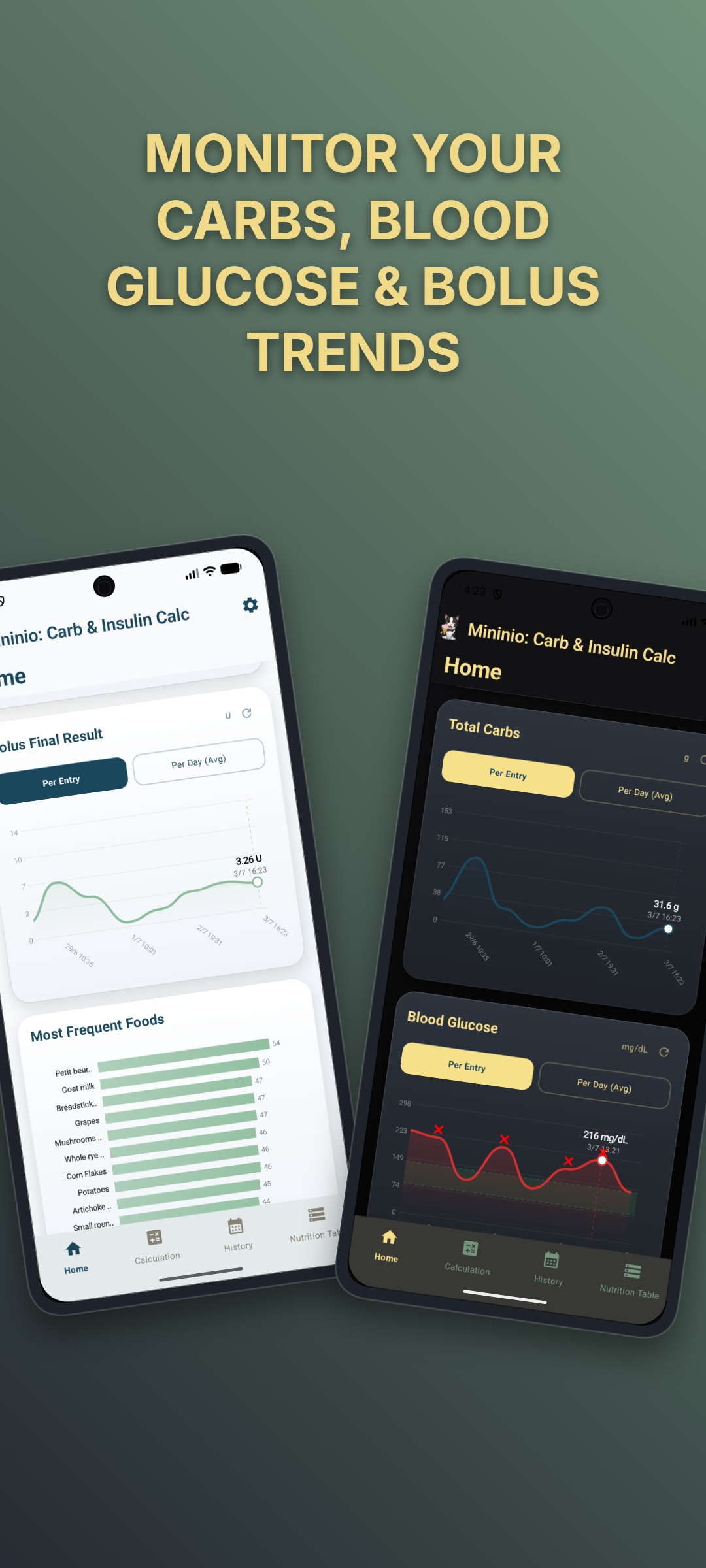
Mininio: Carb & Insulin Calc Screenshot

Everything you need, nothing you don't

Mininio combines instant carb calculations, custom insulin ratio math, and a ten-language food database — all running entirely on your device, with no accounts and no cloud.

Instant Carb Calculator

Select from 1,070 foods across 10 languages, enter your portion size, and watch the carbohydrate count update as you type.

÷

Custom Insulin Ratio Math

Enter your own insulin-to-carb ratios for Morning, Midday, and Evening. The app performs the division — nothing more, nothing less.

Glucose Correction Arithmetic

Optionally apply your personal glucose correction formula using your own threshold, baseline, and divisor values.

Days Tracked Motivation

30 unique milestone tiers celebrate your consistency, from Day 1 to 2000+. Tap for an interactive emoji rain reward.

📈

Interactive Statistics Dashboard

Explore 5 premium charts with pinch-to-zoom, drag-to-pan, and time range filters for deep insight into your trends.

🔒

100% Offline & Private

No servers, no cloud sync, no analytics, no network calls. Your eating history never leaves your device. Period.


See it in action

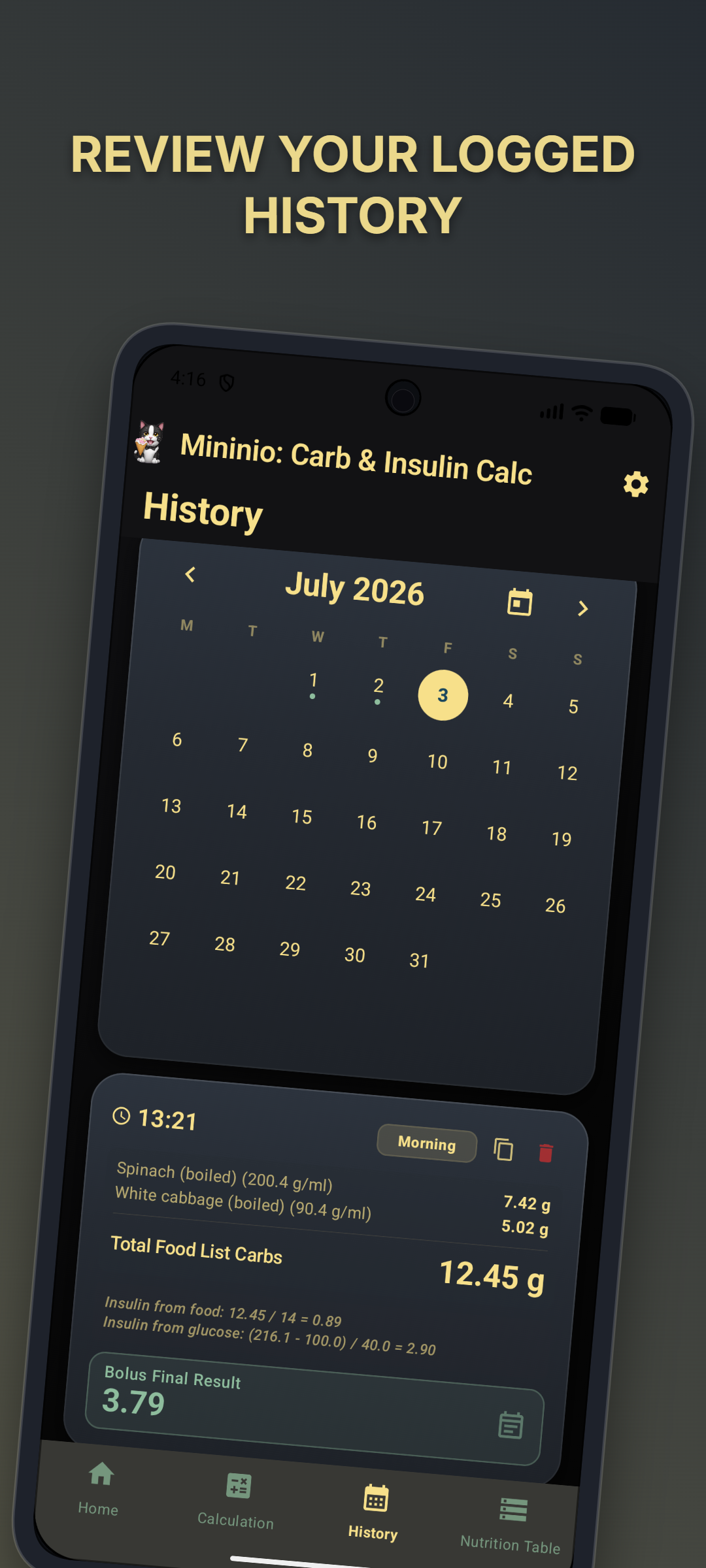
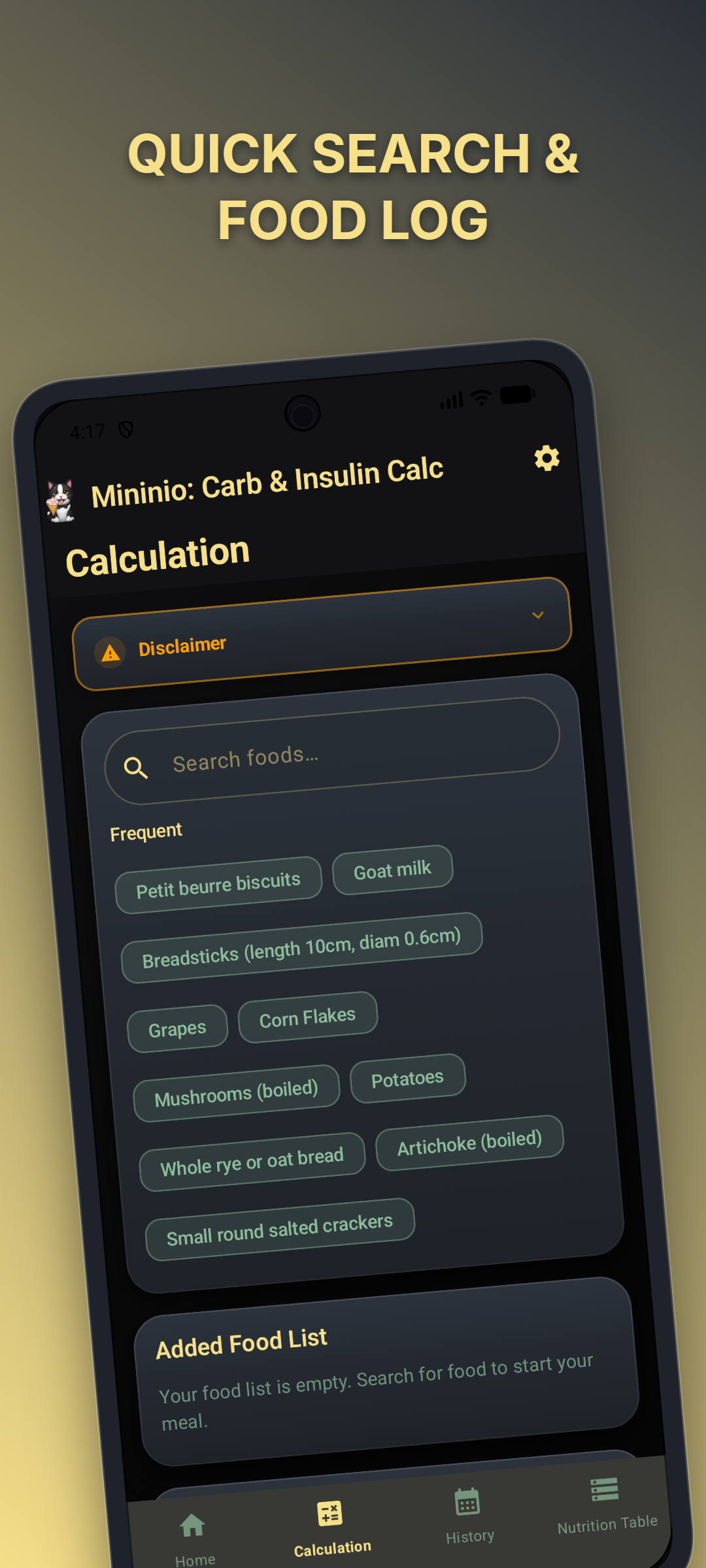
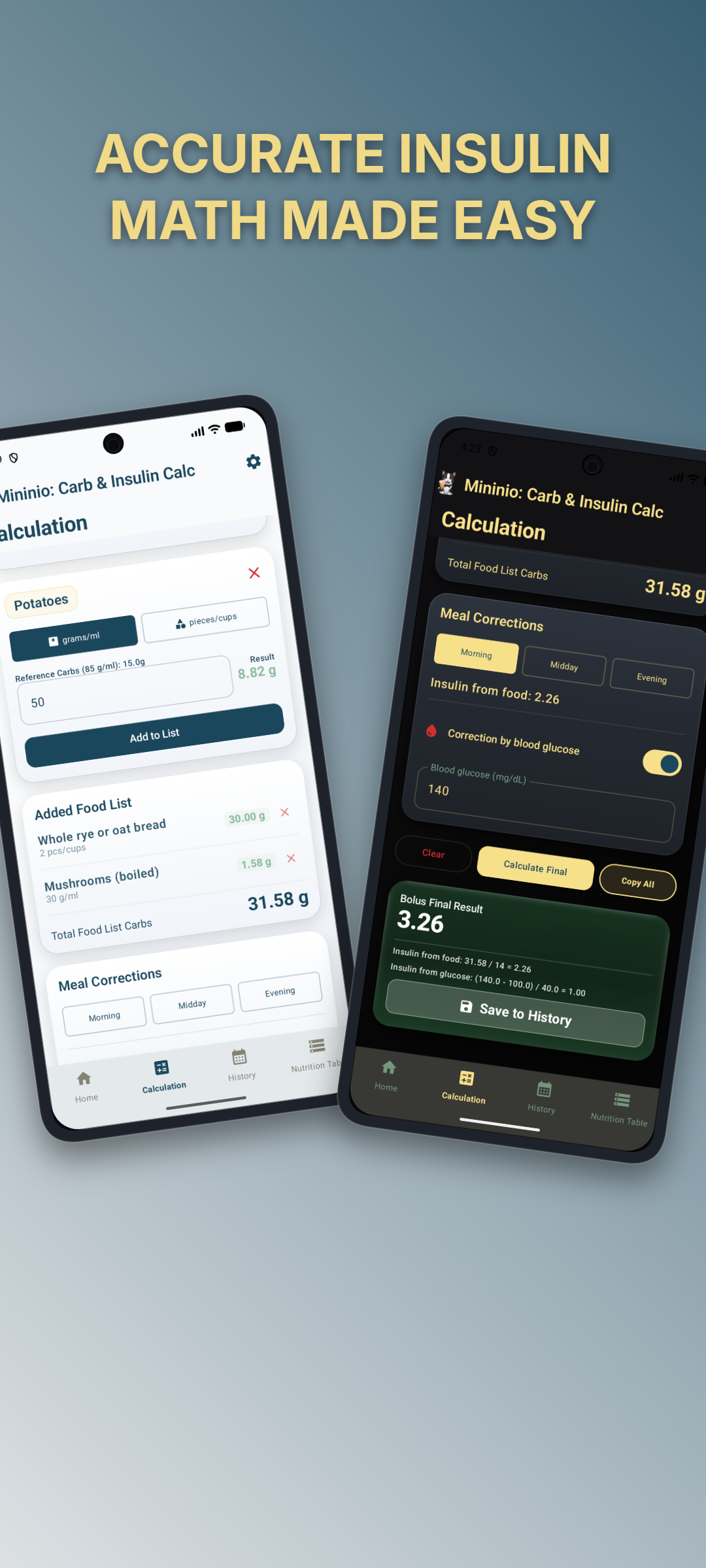
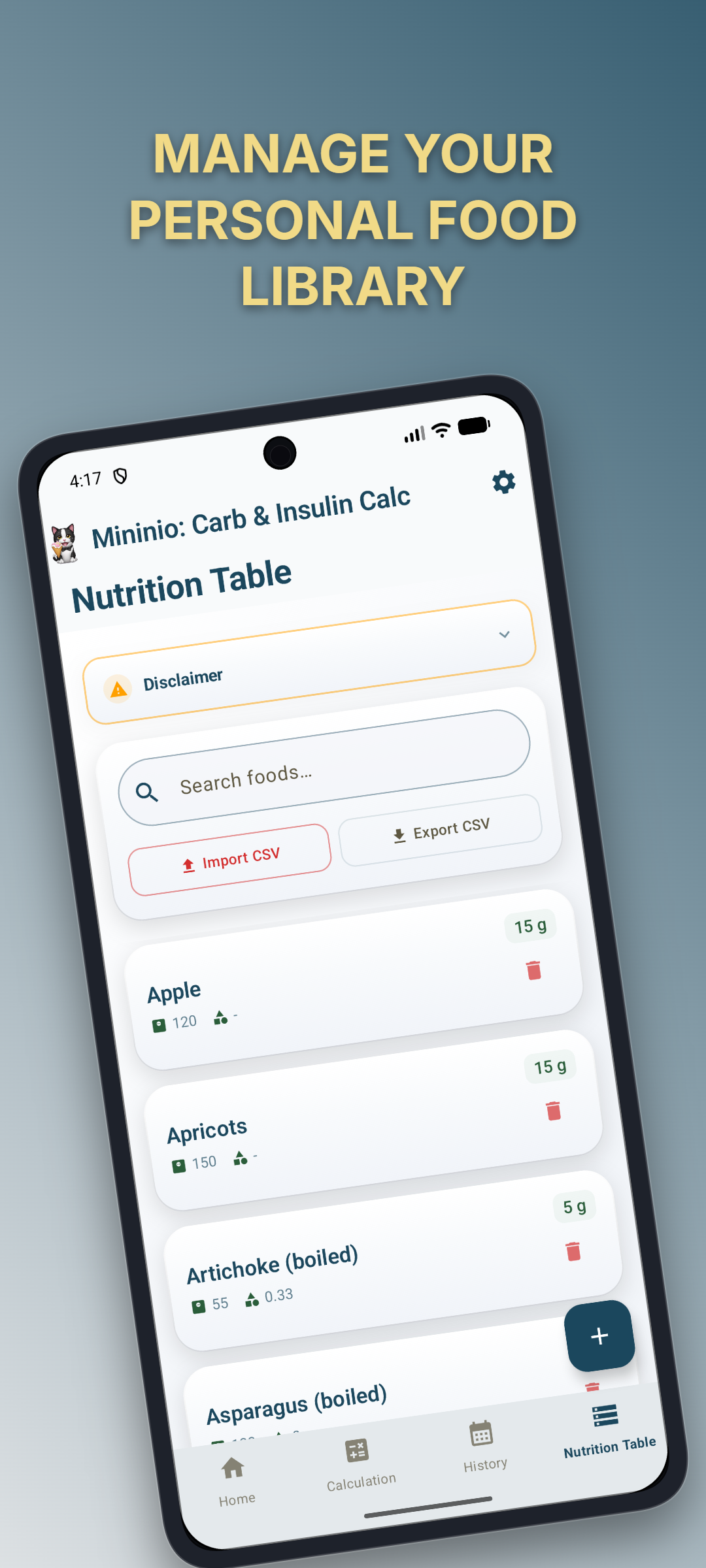
A look inside the app's four-tab layout.
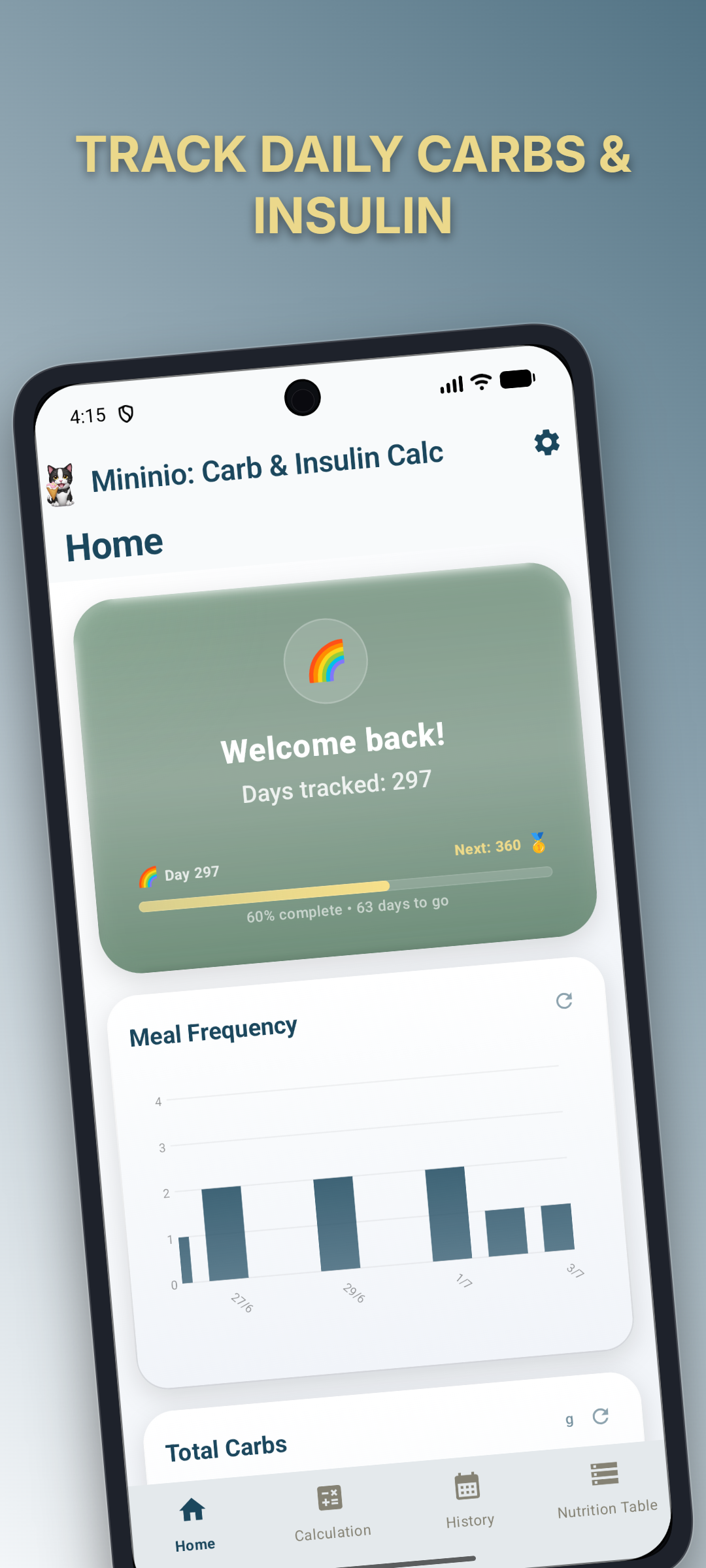
Home Screen Dashboard
Carb Calculator
Calculation Screen
History Calendar
Nutrition Table
Settings Screen

How the math works — transparently

Mininio is a calculator, not a medical device. Here's exactly what it does and doesn't do.

✓ What it does

  • Takes the total grams of carbohydrate you logged and divides by your user-entered ratio (e.g., 100g ÷ ratio of 15 = 6.67 units)
  • Performs standard glucose-correction arithmetic using your own threshold, baseline, and divisor values
  • Saves your calculation history locally for you to review, copy, and track over time
  • Provides interactive charts to visualize your trends — frequency, top foods, carbs, glucose, and bolus results

✗ What it does NOT do

  • Never suggests, recommends, or adjusts your insulin ratios
  • Never calculates a dose based on internal logic or medical guidelines
  • Never claims to replace professional medical judgement
  • Never transmits your data to any server — there is no backend, no cloud, no analytics

Disclaimer: Mininio: Carb & Insulin Calc is a general wellness tool and mathematical calculator, NOT a medical device. Always consult your healthcare provider before adjusting your medication or diet.


Changelog

Automatically updated on every release.

v0.19.1

21 Aug 2026
  • Fix: Replaced `enableEdgeToEdge()` with `WindowCompat.setDecorFitsSystemWindows` + manual system-bar icon contrast to clear the Play Console "deprecated APIs for edge-to-edge" finding (`setStatusBarColor`/`setNavigationBarColor` no longer referenced in the release dex).
  • Fix: System bar icons now follow the app's selected theme mode (LIGHT/DARK/SYSTEM) instead of only the system theme.
  • Fix: Screen is locked to portrait orientation — rotating the device no longer rotates the UI.
  • Build: Enabled R8 resource shrinking for release builds (smaller APK, better performance).

v0.19.0

21 Aug 2026
  • Feature: Food search is now accent-insensitive and case-insensitive across all 10 languages — `γάλα` matches `γαλα`, `café` matches `cafe`, while Devanagari (Hindi) and kana (Japanese) marks are preserved.
  • DB: Added `food_normalized` column to the `food_items` table with schema migration (2.sqm) and a one-time backfill of existing rows on first launch after upgrade.
  • Test: Added `StringNormalizerTest` and `FoodRepositorySearchTest` covering accent folding and SQL LIKE wildcard escaping.

v0.18.2

18 Aug 2026
  • Maintenance: Updated core dependencies to latest stable versions:
  • Android Gradle Plugin: 9.2.1
  • Kotlin/Compose Plugin: 2.4.10
  • Compose BOM: 2026.08.00
  • AppCompat: 1.8.0
  • JUnit Jupiter: 6.1.3

v0.18.1

17 Jul 2026
  • Fix: Removed size descriptors (small/medium/large) from piece-count unit text across all 10 nutrition table CSV locales, fixing unit normalization matching.
  • Fix: German "Stk." (with trailing period) now properly normalizes to "pcs" in UnitNormalizer.

v0.18.0

17 Jul 2026
  • Feature: Food quantity units (g/ml/pcs/cup/tbsp/slice) are now fully preserved end-to-end — from CSV import through DB storage, nutrition table, food selection, tally display, history, and copy-all text, localized across all 10 languages.
  • Feature: New `UnitNormalizer` utility maps 10 languages' unit terms to standard codes on CSV import.
  • Feature: Nutrition Table editing dialog now includes unit dropdown selectors for both measurement modes.
  • Feature: Plural-aware unit display for slice(s) and cup(s) in 7 inflected languages using parenthetical/slash notation.
  • DB: Added `gram_ml_unit TEXT` and `count_unit TEXT` columns to the `food_items` table with schema migration (1.sqm).
  • Refactor: Tally entries and history now store and display unit codes instead of hardcoded strings, enabling correct localized display across all locales.
  • Refactor: `NumberParser.extractFloat()` rewritten with two-pass regex for robust decimal/fraction/unit parsing.
  • Refactor: Centralized `unitLabelMap` in ComputationScreen using `UnitNormalizer.ALL_UNIT_CODES` — single source of truth.
  • Fix: Greek "φέτα" (slice) now correctly normalized to "slice" code on CSV import.
  • Test: Added 10 test cases for `extractFloatWithUnit()` covering number+unit, fraction+unit, comma decimals, space-less, and edge cases.

v0.17.3

13 Jul 2026
  • Refactor: Simplified layout code by replacing Spacer weight patterns with Modifier.weight on labels in Calculation, History, and PremiumComponents.

v0.17.2

13 Jul 2026
  • UI: Added italic doctor-consultation disclaimers to all 3 setup wizard steps and the nutrition table import confirmation dialog, with translations in 10 languages.

v0.17.1

11 Jul 2026
  • Maintenance: Updated project dependencies to latest stable versions: Compose BOM 2026.06.01, Lifecycle 2.11.0, and JUnit 6.1.1.

v0.17.0

11 Jul 2026
  • Feature: Interactive tutorial overlay on the Calculation screen with 6 guided steps (search, select, add, corrections, actions, result) and smooth spotlight transitions.
  • Feature: FAQ screen with 12 questions covering calculation, insulin, glucose correction, history, privacy, nutrition data, food management, statistics, language switching, and setup.
  • Feature: "Help" section in Settings (tutorial replay + FAQ link). Tutorial plays automatically on first visit to the Calculation tab.
  • i18n: All tutorial and FAQ content translated into 10 languages.
  • Fix: Prevent cooldown bypass on the last tutorial step for reliable completion tracking.

v0.16.0

10 Jul 2026
  • Feature: Added "Rate the App" button in Settings with Play Store deep-link and fallback to browser.
  • UI: Rate button uses thumbs-up icon for a friendly, encouraging tone.

v0.15.19

07 Jul 2026
  • UI: Alphabetically sorted language pickers (Settings and Setup Wizard) by native-script display name (Deutsch, English, Español, Français, Italiano, Português, Ελληνικά, हिन्दी, 中文, 日本語).

v0.15.18

07 Jul 2026
  • Fix: Corrected "Copy All" button typography on Calculation screen (labelSmall -> labelMedium) and added overflow ellipsis to prevent clipping in longer translations.

v0.15.17

07 Jul 2026
  • UI: Added "Food" and "Carbs" column headers to history entry cards for clarity.
  • UI: Added "--- Carbs ---" section header to copy-all text output and renamed "Total" to "Total Carbs" across all 10 languages for better clipboard descriptiveness.

v0.15.16

07 Jul 2026
  • UI: Added "U" (or "E" for German) insulin dosage unit suffix to all on-screen insulin values, copy/paste text, and chart labels across all 10 languages.

v0.15.15

07 Jul 2026
  • UI: Strengthened medical disclaimer across all 10 languages — added doctor consultation requirement, not-a-substitute clause, independent verification warning, emergency guidance, use-at-own-risk notice, and not-a-medical-device disclaimer.

v0.15.14

07 Jul 2026
  • UI: Added "Food" and "Carbs" column headers to the tally list in the Calculation screen.
  • UI: Renamed calculation result label from generic terms ("Result") to carb-specific terms ("Carbs") across all 10 languages.
  • Fix: Corrected header spacer width in tally list to align with entry row icon buttons.

v0.15.13

06 Jul 2026
  • Build: Disabled language splitting in Android App Bundle so all 10 language resources are included in the initial Play Store install, instead of downloading each language on-demand when a user switches.

v0.15.12

06 Jul 2026
  • UI: Custom branded splash loading screen with animated glow logo, typography, and version footer, replacing simple loading dots.
  • Fix: Blocked touch passthrough during splash exit animation to prevent accidental tab/button taps.
  • Refactor: Dedicated `splash_subtitle` string resource instead of parsing subtitle from `app_name`.
  • Refactor: Consistent `isDark` variable naming in `SplashLoadingContent`.

v0.15.11

06 Jul 2026
  • Behaviour: Calculation result now auto-scrolls into view after tapping Calculate, so the user sees the result immediately without manual scrolling.
  • Behaviour: History tab now auto-selects today's date on open, removing the extra tap to pick a day from the calendar.

v0.15.10

06 Jul 2026
  • UI: Medical disclaimer banner now collapsed by default with tap-to-expand, and uses left-aligned text instead of justified for cleaner word spacing on mobile screens.
  • UI: Added breathing room between the "Reference carbs" label and the quantity input field in the selected food card.
  • UI: Fixed blood glucose input being covered by the keyboard — added `imePadding()` to the calculation screen's `LazyColumn` for proper keyboard-aware scrolling.

v0.15.9

04 Jul 2026
  • Bug Fix: Developer seed section now correctly hidden in release builds by explicitly setting `isDebuggable = false` for the release build type.
  • Developer Tools: Seed data generation feature is now properly gated behind debug builds only, preventing it from appearing in production releases.

v0.15.8

03 Jul 2026
  • Refactor: Updated directory and repository references to reflect the rename to `mininio-carb-insulin-calc`.

v0.15.7

03 Jul 2026
  • Rename: App renamed from "Mininio Carb Tracker" to "Mininio: Carb & Insulin Calc" across all user-visible strings, class names, and documentation.
  • Refactor: Renamed `MininioCarbTrackerApp` to `MininioApp` and `MininioCarbTrackerTheme` to `MininioTheme`.

v0.15.6

16 Jun 2026
  • Refactor: Renamed package to `com.kgiantsios.mininiocarbtracker` and app name to "Mininio: Carb & Insulin Calc".

v0.15.5

16 Jun 2026
  • Refactor: Renamed "streak" system to "days tracked" — now counts all unique days ever logged instead of consecutive days with a strict reset, making the system more forgiving for users who miss a day.
  • UI: Replaced milestone emojis with background rendering issues (360🎆→🥇, 540🎇→♾️, 1260⚛️→☄️) for cleaner display on all Android versions.

v0.15.4

16 Jun 2026
  • Fixed: Charts on the Home screen no longer block vertical scrolling. Replaced `detectTransformGestures` with a custom direction-aware gesture handler (`detectChartGestures`) that distinguishes vertical drags (scroll) from horizontal drags (pan) and pinches (zoom).

v0.15.3

08 Jun 2026
  • UI: Medical disclaimer banner now uses an accordion-style design — defaults to expanded, tappable to collapse/expand with smooth chevron rotation animation.

v0.15.2

08 Jun 2026
  • Bug Fix: Loading a different language nutrition table from the import dialog now correctly replaces existing data (previously silently skipped when data existed).
  • Bug Fix: Import confirm dialog now closes before showing seed errors, preventing overlapping dialogs.
  • Bug Fix: Seed/DB errors no longer incorrectly display CSV formatting instructions.
  • Refactor: Extracted shared `LanguagePickerSection` composable, eliminating duplication between SetupWizard and NutritionTableScreen.
  • UI: Added medical disclaimer banner to the import confirm dialog.

v0.15.1

07 Jun 2026
  • Medical Disclaimer: Renamed string resource from `setup_disclaimer` to `medical_disclaimer` to reflect its use across Setup Wizard, Calculation, and Nutrition Table screens. Added justified text alignment and extended the banner to Calculation and Nutrition Table tabs.

v0.15.0

07 Jun 2026
  • Setup Wizard: Replaced the single setup dialog with a 3-step wizard (Glucose Calculation → Meal Insulin Dividers → Nutrition Table) for a clearer first-run experience.
  • Medical Disclaimer: Added a persistent disclaimer banner across all wizard steps, noting that values should be set under medical guidance and can be changed later via Settings.
  • Native Language Names: Nutrition table language picker now displays each language in its native script (Ελληνικά, Français, Español, हिन्दी, Italiano, Português, 中文, Deutsch, 日本語).
  • Skip Option: Users can skip the nutrition table setup entirely and start with an empty database.
  • Input Validation: Numeric fields in the wizard and Settings now revert to the last valid value when focus is lost with invalid input.

v0.14.3

07 Jun 2026
  • Security Hardening: Enabled R8 code shrinking and obfuscation for release builds with comprehensive ProGuard keep rules for SQLDelight, Compose, DataStore, and ViewModels.
  • Tamper Detection: Added APK signature verification at startup to detect repackaged or modified APKs.
  • Backup Rules: Added explicit backup configuration (Android 6-11 `fullBackupContent` + Android 12+ `dataExtractionRules`) to ensure database and settings survive phone switches and reinstalls while excluding cache and temp files.
  • Smoke Test Checklist: Added post-release manual verification steps to AGENTS.md to catch R8-induced runtime regressions.

v0.14.2

07 Jun 2026
  • Bug Fix: Selecting "System Default" in the language picker now correctly triggers the language change confirmation dialog and applies the system locale.

v0.14.1

07 Jun 2026
  • Bug Fix: Japanese nutrition table CSV now uses spaces between numbers and units (個, 枚, 本, カップ, サイズ, 大さじ), matching the format convention of all other locale CSVs. Fixes seeding failure on Japanese language selection.

v0.14.0

07 Jun 2026
  • Multi-Language Expansion: Added German and Japanese translations (UI strings + localized nutrition table food names), bringing total to 10 languages.
  • Added `values-de/` and `values-ja/` string resource directories alongside new CSV seed files for both locales.
  • Renamed Chinese resource directory from `values-zh-rCN/` to `values-zh/` for consistency with locale code usage across the app.

v0.13.3

07 Jun 2026
  • Clipboard text now uses localized format strings across all 8 languages, replacing previously hardcoded English labels (Total, Insulin from food, Insulin from glucose, Final Result).
  • Clipboard glucose values now correctly display without trailing zeros (e.g., 180 instead of 180.0), matching pre-refactor behavior.

v0.13.2

07 Jun 2026
  • Simplified setup dialog: removed flag emojis from language selection cards for a cleaner look.
  • Cleaned up 64 orphaned emoji string resources across all 8 locale files.

v0.13.1

07 Jun 2026
  • Dependency Updates: Compose BOM 2025.05.01 → 2026.05.01, Kotlin Compose Plugin 2.3.21 → 2.4.0, core-ktx 1.18.0 → 1.19.0, datastore-preferences 1.1.3 → 1.2.1, appcompat 1.7.0 → 1.7.1, mockk 1.14.9 → 1.14.11.
  • Resolved deprecation warnings from Compose BOM bump (asFrameworkPaint → AndroidCanvas cast with @Suppress, MenuAnchorType → ExposedDropdownMenuAnchorType).

v0.13.0

07 Jun 2026
  • Multi-Language Support: Added 7 new languages — Greek, French, Spanish, Hindi, Italian, Portuguese, and Mandarin — each with fully translated UI strings and nutrition table food names. Language auto-detected from system locale; manually adjustable via new Language picker in Settings.
  • Localized Nutrition Tables: Bundled 8 locale-specific CSV files (107 foods each) for complete food name and unit translation across all supported languages.
  • Expanded Setup Dialog: First-launch setup now presents all 8 language options with flag emojis, replacing the auto-seed approach.
  • AppCompat Migration: Upgraded MainActivity from ComponentActivity to AppCompatActivity for robust locale switching via AppCompatDelegate.
  • Language Persistence: Language choice saved to DataStore across restarts; changing language in Settings restarts the activity to apply new locale.
  • UI Overflow Fixes: Navigation bar tab labels and dialog buttons now truncate with ellipsis when text overflows in longer translations.
  • Branded Borders & Geometry: Interactive elements feature a consistent 1.5dp branded border (Rhino Teal or Naples Yellow) for sharp definition.
  • Database Seeder Refactored: Generic `seed(languageCode)` replaces deprecated `seedGreek()`/`seedEnglish()` methods.
  • Premium Design System: "Rhino & Naples" tonal surface hierarchy with three-stop vertical gradients, API-gated glassmorphism, multi-weight typography, branded shimmers, and custom soft shadows.

v0.12.2

06 Jun 2026
  • Bug Fix: Streak milestone celebration badge now appears only on exact milestone days (1, 2, 3, 5, 10...) instead of every day.

v0.12.1

06 Jun 2026
  • Bug Fix: Test data generator now correctly increments food usage counts, so frequent foods appear after seeding.

v0.12.0

06 Jun 2026
  • Time Range Filtering: Added 7-day, 30-day, 90-day, and All Time filters to the Statistics dashboard for flexible history analysis.
  • Adaptive Chart Markers: Achievement stars and high-glucose "X" alerts now scale and fade based on data density, maintaining clarity during zoom/pan.
  • Enhanced Zoom: Maximum chart zoom increased from 5x to 10x for deeper inspection of dense historical data.
  • Developer Test Data Generator: New option in Settings to populate the database with synthetic calculation history for testing and demonstration.
  • Zoom/Pan UX: Replaced time range toggle buttons with native pinch-to-zoom and drag-to-pan gestures for smoother chart exploration.
  • Library Desugaring: Enabled JDK 8+ desugaring (`coreLibraryDesugaring`) for `java.time` compatibility on API 24+ devices.

v0.11.2

06 Jun 2026
  • Chart Layout Refinements: Reduced padding and increased chart heights for a more compact, data-dense view.
  • Rotated X-Axis Labels: Date labels now display at a 45° angle on chart cards, preventing overlap on narrow screens.
  • Adaptive Label Count: PremiumLineChart dynamically adjusts visible date labels when zooming and panning.
  • Bug Fix: Corrected tooltip tap offset where touch-to-datapoint selection was misaligned by ~8dp.

v0.11.1

06 Jun 2026
  • UI Refinements: Added consistent press-scale animation to all interactive buttons (dialogs, FAB, date picker, settings gear).

v0.11.0

24 May 2026
  • Advanced Statistics Dashboard:
  • 5 Premium Charts: Added interactive plots for Meal Frequency, Top Foods, Total Carbs, Blood Glucose, and Bolus Result.
  • Interactive Analysis: Implemented Pinch-to-Zoom (up to 5x) and Drag-to-Pan on all line charts for deep history exploration.
  • Smart Tooltips: Added tap-to-inspect gestures showing exact values and timestamps with theme-aware styling.
  • Health Visualizations: Integrated a green "Safe Zone" (80-140 mg/dL) and red "X" floating alerts for high glucose readings.
  • Flexible Views: Added independent "Per Entry" and "Daily Average" toggles for every plot card.
  • Gamified Streak System:
  • Dynamic Welcome Card: High-fidelity hero section with glassmorphism and a progressive "Experience Bar."
  • 30 Unique Milestones: Comprehensive reward path from Day 1 (🎊) to 5 Years (🪐) with exclusive emojis and messages.
  • Interactive Celebration: Tapping the achievement badge triggers a particle-based "Emoji Rain" shower.
  • Smarter Greetings: Adaptive messaging ("Welcome" vs "Welcome back") and precise countdowns to next milestones.
  • UI Refinements:
  • Optimized Chart Layout: Added inner horizontal padding to plots for a more balanced, professional look.
  • High-Contrast Indicators: Improved achievement star contrast for Light Mode.

v0.10.0

24 May 2026
  • New Home Screen & Navigation Update:
  • Home Landing Screen: Added a new `HomeContent` as the first screen of the app with a simple "Welcome back" message.
  • 4-Tab Navigation: Updated the bottom navigation bar to include Home, Calculation, History, and Nutrition Table.
  • Back-Press Logic: Implemented back-button handling where pressing back from other screens returns the user to the Home screen.
  • Branding Continuity: Applied the "Rhino & Naples" design system to the new Home screen.

v0.9.0

24 May 2026
  • Navigation & Layout Modernization:
  • Bottom Navigation: Replaced top tabs with a modern `NavigationBar` for better reachability.
  • Top Screen Titles: Added dynamic, bold screen titles at the top of every screen.
  • Integrated Calculation Flow: Moved the final result card and action buttons into the scrollable list on the Calculation screen for a more natural, top-to-bottom workflow.
  • Premium Navigation Style: Implemented a sleek, indicator-less navigation bar with proper system inset handling ("efood" style).

v0.8.2

24 May 2026
  • Premium Visual Overhaul (Final Pillars):
  • Glassmorphism (Pillar 2): Implemented API-gated `RenderEffect` blur on API 31+ for a true frosted glass effect, isolated to background layers to keep content crisp.
  • Tactile Depth (Pillar 5): Replaced standard shadows with a custom `softShadow` modifier using `drawBehind` for more diffused, high-end visual elevation.
  • UI Polish: Refined border definitions and layering for `ModernDialog` and `ResultCard`.

v0.8.1

24 May 2026
  • Premium micro-interactions: spring-based press scale animations on all buttons, chips, and cards
  • Sophisticated motion: shimmer loading skeletons for food search and nutrition table
  • Performance: optimized search debouncing with visual feedback

v0.8.0

24 May 2026
  • **Premium Visual Overhaul (Pillar 3)**:
  • **Premium Typography**: Implemented a comprehensive multi-weight hierarchy (Light to ExtraBold) with optimized letter spacing and line heights for a refined, modern aesthetic.
  • **Headline Optimization**: Redefined `headlineLarge` as a prominent ExtraBold 32sp style for high-contrast numeric displays (final results).
  • **UI-wide Audit**: Standardized typography roles across all screens, replacing hardcoded weights with semantic Material 3 roles.

v0.7.0

24 May 2026
  • **Premium Visual Overhaul**:
  • **Tonal Surface Hierarchy**: Deepened the light theme background (`#E9EDF2`) and saturated the primary colors for significantly improved contrast and structural clarity.
  • **Sophisticated Gradients**: Introduced subtle, directional linear gradients to all cards and page backgrounds, providing a sense of natural light and depth.
  • **Glassmorphism**: Primary action cards (like the Result Card) and all Dialogs now use semi-transparent layered gradients for a modern, high-end feel.
  • **Tactile Depth**: Added soft shadows and high-contrast borders to cards in Light Mode to make them "pop" and feel like distinct physical layers.
  • **Splash Screen**: System splash screen shown on launch while DataStore settings initialize
  • **Initialization Guard**: UI waits for settings to load before rendering content
  • **IME & Focus Handling**: Input fields auto-scroll into view when focused; dialogs scroll with IME open
  • **Enhanced Food Selection UI**: Refactored food selection card and improved tally list interaction
  • **Save Button Redesign**: Updated save-to-history button appearance and card spacing
  • **MealTime Button Colors**: Fixed button colors to use the primary color scheme

v0.6.0

23 May 2026
  • **User-Configurable Settings**: New Settings screen with theme, glucose parameters, and meal insulin dividers
  • **Reactive Calculations**: Food insulin and final result update automatically when settings change
  • **History Self-Describing Entries**: Saved calculations now store meal labels, glucose threshold, baseline, and divisor
  • **Meal Labels from Button**: Meal time labels are now derived from the user's selected button, not from divider values — no collision issues
  • **Back Button Support**: System back button closes the Settings screen instead of exiting the app
  • **Snackbar Feedback**: "Settings updated" confirmation when changing any setting
  • **Defensive Guards**: Zero-divisor protection and non-negative insulin correction clamping

v0.5.0

20 May 2026
  • **Calendar Navigation**: Clickable Month/Year header opens a DatePicker to jump to any date.
  • **Quick Today**: New "Today" button in the calendar header for instant return to current date.
  • **UI Polish**: Fixed rectangular ripples on date selection (now clean circular feedback).
  • **History Cards**: Redesigned history entries with meal badges (Morning, Midday, Evening) and structured calculation formulas.
  • **Consistency**: Final result styling in History tab now matches the green ResultCard in the Calculation tab.
  • **Cleanup**: Removed dead imports and simplified FontStyle references.

v0.4.1

20 May 2026
  • Added food deselection button to clear selected item in Calculation tab

v0.4.0

20 May 2026
  • New History tab with calendar view for saved calculations
  • Save final calculation to history (bookmark button in result card)
  • Hard deduplication — identical calculations cannot be saved twice
  • Soft 3-per-day limit with confirmation dialog for additional entries
  • Meal time detection from device clock (Morning 4–12, Midday 12–17, Evening 17–4)
  • Meal time mismatch warning when selected divider doesn't match current time
  • Full copy support per history entry (matches "Copy All" format)
  • Meal time label in insulin calculation line (e.g., `Insulin from food: 87.00 / 12 (Morning) = 7.25`)
  • Tab icons: Calculate, CalendarMonth, and Storage (modern Material icons)
  • View, browse, and delete past calculations from the calendar screen

v0.3.2

20 May 2026
  • CSV import error messages now include format guidance

v0.3.1

20 May 2026
  • Food search and nutrition table UI refactor
  • Tally entry UI improvements and numeric formatting
  • CSV import and export for food data

v0.3.0

19 May 2025
  • Multi-tab navigation between Calculation and Nutrition Table
  • English language support and nutrition database CRUD operations
  • Custom ModernDialog component replacing system AlertDialogs
  • Refactored calculation logic into utility classes
  • Comprehensive unit tests for calculation, parsing, and validation

v0.2.1

18 May 2025
  • Frequent foods feature with usage count and last-used tracking
  • Quick re-selection via AssistChip row above food list

v0.2.0

17 May 2025
  • Card-based Material 3 UI layout with logical grouping
  • Automatic carbohydrate calculation (calculateQuietly)
  • Blood glucose correction logic
  • Individual tally entry removal
  • Copy-to-clipboard includes total and final insulin results
  • Carbohydrate value display for selected food items

v0.1.0

16 May 2025
  • Project restructured — legacy Python implementation removed
  • SQLDelight food database initialized with CSV seeding
  • New app launcher icons and logo assets
  • Creative Commons BY-NC-SA 4.0 license
  • All lint warnings fixed, dependencies upgraded
  • AGENTS.md documentation added

v0.0.3

6 May 2025
  • Copy-to-clipboard functionality
  • Emoji UI polish

v0.0.2

4 Apr 2025
  • Enhanced calculation functionality
  • UI element adjustments

v0.0.1

16 Jan 2025
  • Initial release

Privacy Policy

Last updated: 21 Aug 2026

Privacy Policy

This privacy policy applies to the Mininio: Carb & Insulin Calc app for mobile devices, together with any related services operated by Konstantinos Giantsios (collectively, the “Application”). Konstantinos Giantsios is hereby referred to as the “Service Provider”.

What information does the Application obtain and how is it used?

The Application does not collect, log, or store any personal information when you download and use it. Registration is not required. If the Application is used with an active internet connection, technical protocol data (such as your ephemeral IP address) is transmitted to facilitate network connectivity, but this data is not retained or used for tracking.

Does the Application collect precise real time location information of the device?

This Application does not collect precise information about the location of your mobile device.

Do third parties see and/or have access to information obtained by the Application?

Since the Application does not collect any information, no data is shared with third parties.

What are my opt-out rights?

Since the Application does not collect personal information through normal use, uninstalling it simply removes the Application from your device.

If you contact the Service Provider directly or voluntarily provide information by other means, you may request deletion of that information by contacting constantinos.giantsios@gmail.com.

Children

The Application is not intended for children under 16 years of age, or such higher age as required by applicable law. The Service Provider does not knowingly solicit data from children or market to them. Since the Application does not collect personal information through normal use, children's data is not at risk from use of the Application alone.

Security

All data stored by the Application resides exclusively on your device. The Service Provider does not have access to this data and does not transmit it over any network.

Changes

This Privacy Policy may be updated from time to time. Any changes will be posted on this page. You are advised to review this Privacy Policy periodically for any changes.

Your Consent

By using the Application, you consent to the terms outlined in this Privacy Policy.

Contact Us

If you have any questions regarding this Privacy Policy, please contact: constantinos.giantsios@gmail.com.